
WordPress Internal Link Checker
Scan stored internal links in WordPress and Oxygen, review HTTP results and export a report.
Is this the right plugin for you?
For WordPress and Oxygen editors who need to find stored internal links and their source pages.
What it helps you do
Review failed internal links and redirect chains, then open the source document and fix its destination.
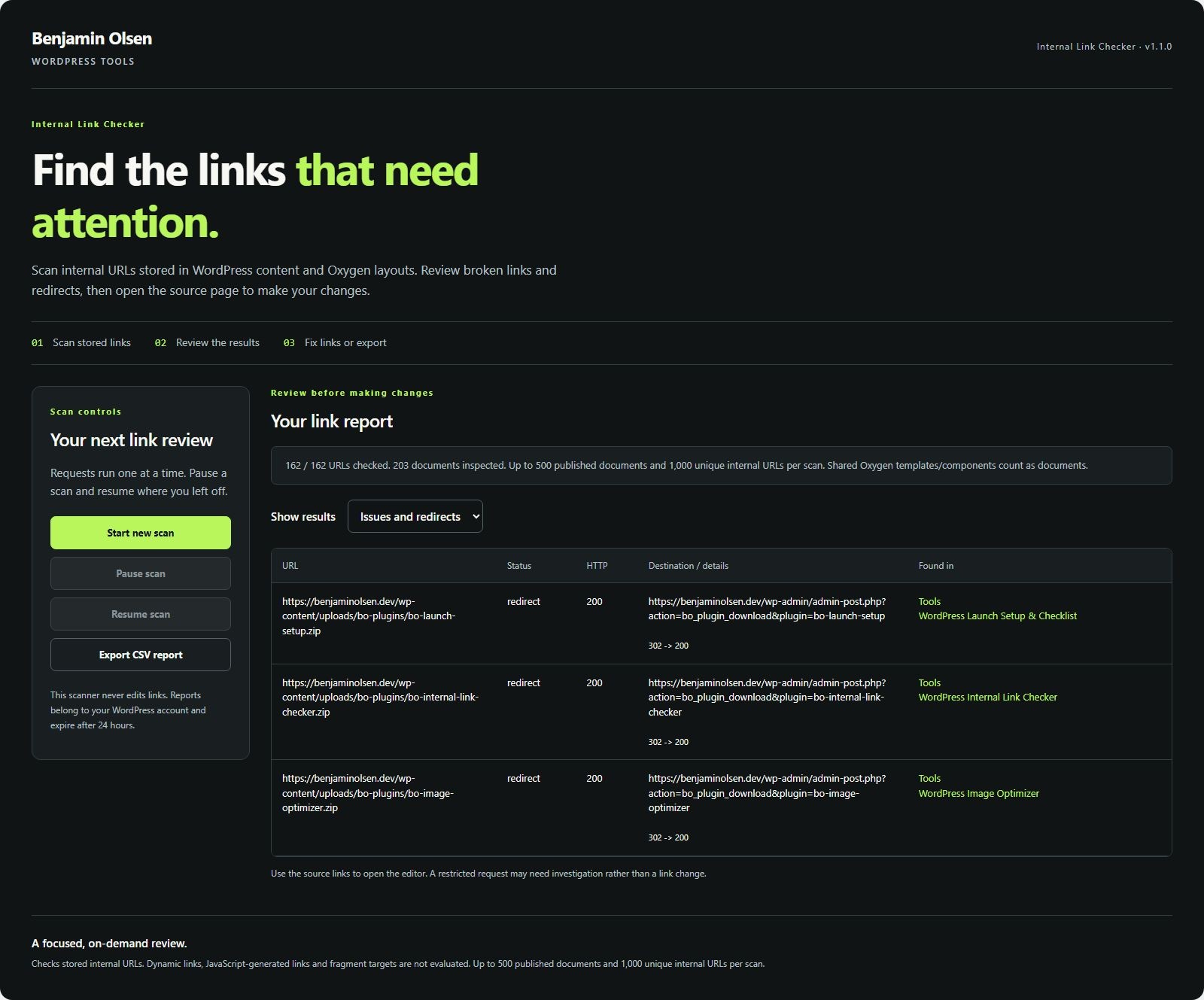
See the actual interface
Install and try your first task
- Download, upload and activate the ZIP. Use staging for the first scan.
- Open Benjamin Olsen → Internal Link Checker.
- Run a scan and review HTTP results. A timeout needs investigation, not an automatic deletion.
- Open a source page or Oxygen layout and update the relevant link in its editor.
- Run another scan and export a report for the remaining issues.
Check your result
Known stored links have a reviewable HTTP result and source reference. Confirm the corrected link on the real frontend.
Requirements and tested scope
Requires WordPress 6.0+ and PHP 8.0+. The public screenshots show the actual workflow and shared plugin menu. The release metadata records WordPress 7.1.2 compatibility. It does not establish compatibility with every dynamically generated link.
Limits to know before you start
Up to 500 published documents, 1,000 unique internal URLs and 20 source documents per URL. It reads stored WordPress/Oxygen content, not every frontend or JavaScript-generated link. HTTP results reflect the scan time.
Privacy and stored data
The site checks its own internal URLs. Scan results are handled on your WordPress website; export reports stay on your computer. Update checks contact benjaminolsen.dev. Private content is not sent as update telemetry.
Download and updates
Current version: 1.3.0
Download WordPress Internal Link Checker →
Use the existing download flow. Future verified releases appear in WordPress through the included updater.
Requirements and release notes
Version 1.3.0 · WordPress 6.0+ · PHP 8.0+
Updates appear in WordPress → Plugins for installations with the shared updater. Earlier versions may need one manual ZIP replacement.
Changelog
1.3.0
Version 1.3.0 adds standard WordPress update notifications, a View details changelog, verified update packages, and a Check for plugin updates link. Existing workflows and saved settings are preserved.
Report a plugin problem. Include the plugin and WordPress versions, steps to reproduce and any error text. Do not share login details.