
Browser tool
Internal Link Planner
Find relevant internal links, review the evidence and keep track of what you have added. Save your project and pick up where you left off.
Quick start: paste, review, export
1. Paste pages. Open Start without a CSV and paste at least two URLs from the same website, one per line. Add titles and a shared topic using URL | title | topic. Click Use these pages, then Plan internal links.
2. Review suggestions. Check the source, destination and match evidence. Edit the anchor text and note where the link belongs. Keep Include in CSV checked only for tasks you want to export.
3. Export your plan. Click Export selected CSV to download the selected tasks in the current view. Clear filters first if you want all selected tasks. Add the links to your website yourself.
CSV is your selected task list. Save project file keeps the full inventory, notes and decisions so you can reopen the project later. For an example, open See a finished link task in the tool below.
Loading tool…
Choose your starting point
Start with a simple list of URLs and optional titles, upload a URL sitemap XML file, import public WordPress pages/posts, or use CSV for more control. A sitemap imports URLs only. Public WordPress import reads titles and excerpts; browser cross-origin restrictions can prevent access.
url,title,topic,keywords,existing_links
- Use at least two pages, with all URLs on the same origin. The limit is 200 pages and 1 MB.
- Choose descriptive titles. Topics and shared title, keyword and optional content terms determine the suggestions.
- Add the URLs already linked from each source page in existing_links.
- Run the planner and choose one, three or five suggestions per source. Edit anchors, add a next-step note and mark tasks Planned, Done or Rejected. The CSV export includes selected tasks matching both your search and status filter. Save a project file to keep all decisions.
Three pages. One useful link.
Work through this small, fictional service website before importing your own inventory. The example uses example.com addresses and does not contact or change a real website.
- Website design — /design/. Topic: Web design. This page already links to /cost/, so that existing direction is excluded.
- Website project cost — /cost/. Topic: Web design. Review a link to /design/ where the paragraph explains the work included in the project.
- Privacy policy — /privacy/. Topic: Legal. This page has no relevant match and receives no suggestion.
The result is one planned task: /cost/ → /design/, with website design as the anchor. The evidence is a shared Web design topic and the words project and plan. The five match points explain this comparison; they do not predict rankings.
Download the three-page inventory CSVUse Or import CSV in the tool above, choose the downloaded inventory and run Plan internal links. Review the note, keep the one task selected and choose Export selected CSV.
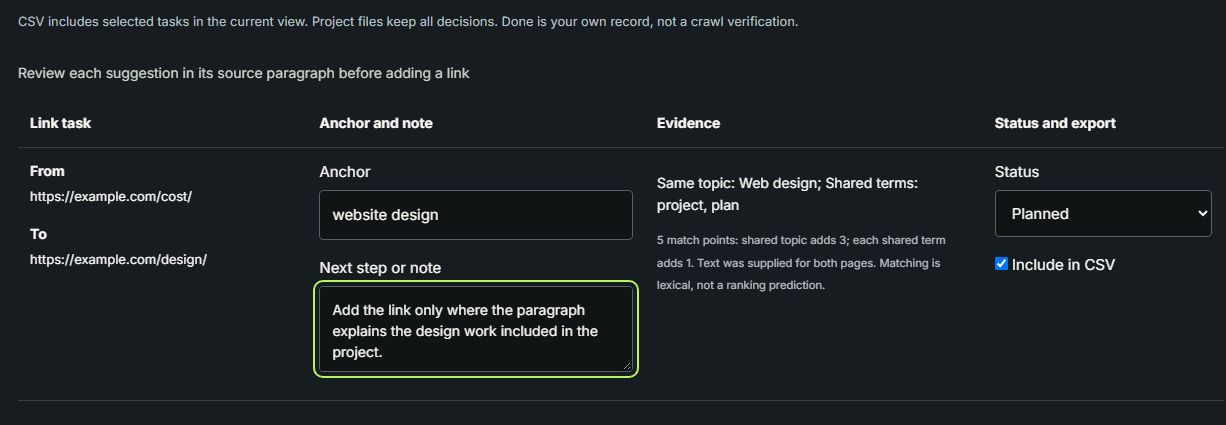
The exported CSV contains one data row. It is a task list for you to act on; it does not add the link to WordPress. Save project file keeps the full inventory, notes and selections so you can continue later using Open project file. Keep that project file as your portable backup.
What the suggestions mean
This is a transparent comparison of your inventory, not a site crawler or a semantic AI analysis. Relevance points count shared topics and words, not SEO authority. The incoming-link summary only reflects existing_links supplied in this CSV; it cannot prove that a page is orphaned. Review each recommendation before editing content.
Your inventory and decisions are processed and saved in this browser, without an account or upload to this tool's server. Browser data can be cleared or unavailable: download a project file as a backup or to move to another browser. Opening a new project or the example exports your current inventory as a backup first. Public WordPress import contacts the website you enter.
Find broken stored internal links with the WordPress plugin