
WordPress Image Optimizer
Preview resized WebP, AVIF or JPEG images and save optimized copies while preserving originals.
Is this the right plugin for you?
For WordPress editors who want to inspect smaller image copies before changing a page.
What it helps you do
Preview resized WebP, AVIF or JPEG copies and save a new attachment while preserving the original.
See the actual interface
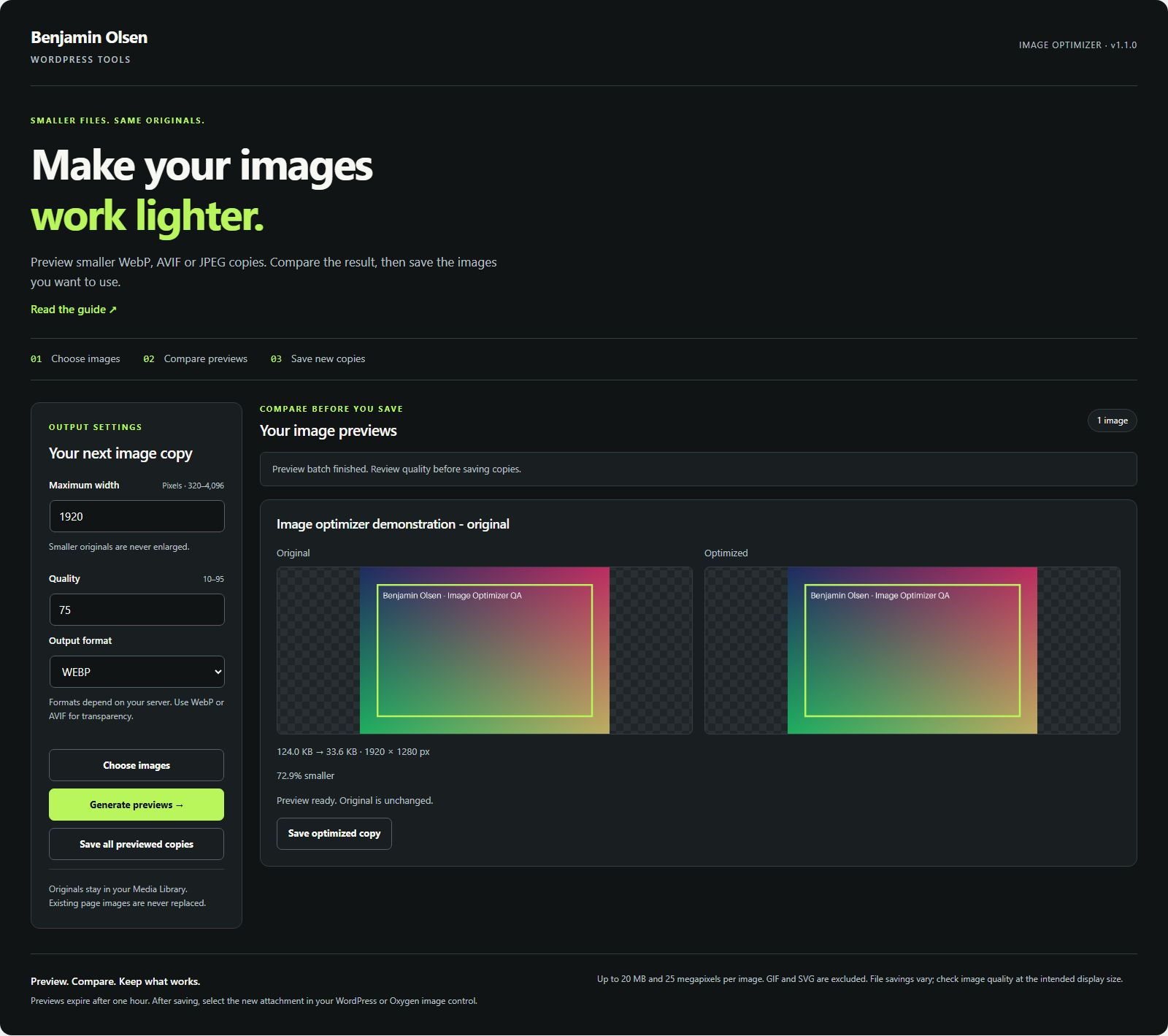
Install and try your first task
- Download, upload and activate the ZIP on a test copy.
- Open Benjamin Olsen → Image Optimizer and choose an existing Media Library image.
- Set a sensible maximum width, quality and supported output format. Generate a preview.
- Inspect text, fine detail and transparency at the intended display size. Compare actual file sizes.
- Save the useful copy, then select the new attachment through the Image control in WordPress or Oxygen.
Check your result
A new Media Library attachment is created with the original caption, description and alternative text. Existing page references and original files remain intact.
Requirements and tested scope
Requires WordPress 6.0+ and PHP 8.0+, upload permission and edit permission for the attachment. Formats depend on the server image editor. The existing documented server example resized a generated 2,400 × 1,600 PNG to a 1,200 × 800 WebP copy, preserving the original.
Limits to know before you start
Up to 20 images, 20 MB and 25 megapixels per image. Width 320–4,096 px; quality 10–95. GIF and SVG are excluded. Images are never enlarged. JPEG loses transparency. An optimized copy can be larger; this is not a CDN or automatic replacement system.
Privacy and stored data
Processing happens on your WordPress server without a third-party image service. Temporary previews expire after one hour and cleanup uses WordPress scheduled tasks. Update checks contact benjaminolsen.dev. The download experiment may request an email; newsletter signup remains optional.
Download and updates
Current version: 1.3.0
Download WordPress Image Optimizer →
Use the existing download flow. Future verified releases appear in WordPress through the included updater.
Requirements and release notes
Version 1.3.0 · WordPress 6.0+ · PHP 8.0+
Updates appear in WordPress → Plugins for installations with the shared updater. Earlier versions may need one manual ZIP replacement.
Changelog
1.3.0
Version 1.3.0 adds standard WordPress update notifications, a View details changelog, verified update packages, and a Check for plugin updates link. Existing workflows and saved settings are preserved.
Report a plugin problem. Include the plugin and WordPress versions, steps to reproduce and any error text. Do not share login details.