
Practically tested on desktop and mobile in a private Oxygen setup. Package names and prices are illustrative.
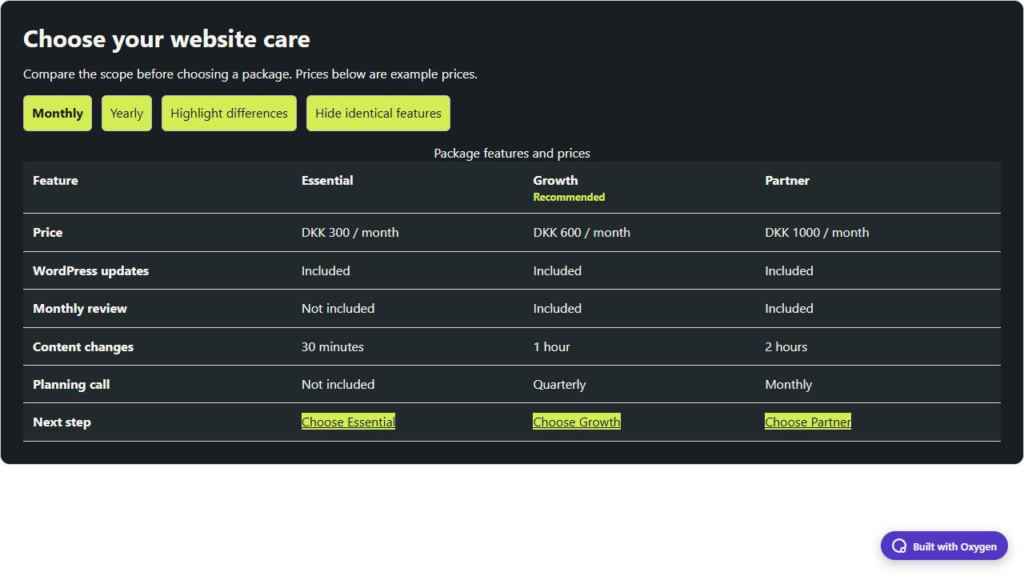
A package comparison is useful when visitors need to understand scope, not just price. BO Package Compare puts two to five packages against the same feature list. Visitors can highlight differences, hide identical rows and switch between monthly and annual prices when you provide both.
Try the website-care comparison →
Create three website-care packages
- Add BO Package Compare in Oxygen. Write a title, explanation and currency code.
- Under Packages, create Essential, Growth and Partner. Enter monthly prices of 300, 600 and 1000, and annual prices of 3000, 6000 and 10000.
- Mark Growth as recommended if you have a reason to recommend it. Set each package’s contact URL and its own link label.
- Add shared comparison rows under Features. For WordPress updates, enter
yesfor all three package values. For Monthly review, useno,yes,yes. - For Content changes, use text values “30 minutes”, “1 hour” and “2 hours”. For Planning call, use
no, “Quarterly” and “Monthly”. Match the values to the package order: the first value belongs to the first package. - Enable the price-period switch and edit its labels, included/not-included text, recommended badge and table caption.
- Save and test the visitor view. Annual prices are the amounts you entered; the plugin does not multiply monthly prices or infer a discount.
Mobile and accessibility
Desktop shows a comparison table with row and column headings. On narrow screens, JavaScript enhances the view with two package selectors, keeping two packages visible together. Choose a different pair and make sure long feature text wraps. The controls avoid selecting the same package twice.
Without JavaScript, every package and both price amounts remain in a horizontally scrollable table. The information stays available even though period and difference buttons are not active. Use concise feature names and a useful table caption; do not rely on the recommendation colour alone.
Check the comparison
Highlight differences should mark rows whose package values differ. Hide identical features should remove shared rows while keeping meaningful differences. Test all-identical packages as well as mixed values, switch periods and inspect the contact destination for every package. Use up to 30 common comparison points; avoid adding dozens of low-value rows just because the limit allows it.
Use Design to adjust table cells, headings, prices, labels, selectors and buttons. Keep enough contrast for text and a visible keyboard focus. This element explains packages; it does not provide checkout, subscriptions, tax calculation or payment processing.
Style it through Oxygen
Open Design and expand the part you want to change. Container controls the background, text colour, accent and padding. Use the native Typography and Borders and shadows popouts for fonts, corners and shadows. Style fields, cards or buttons in their own sections. Choose an Oxygen breakpoint before changing responsive values; your custom breakpoints work too. Two instances can have different colours and layouts without writing CSS.
The demos use my charcoal and lime colours. New elements inherit your site’s typography and start with neutral defaults. Save, reopen the builder and check the published frontend after changing a setting.
Requirements and tested versions
Install Oxygen Workflow Elements 2.0.0 on a separate test site first. It requires the new Oxygen 6, WordPress 6.0+ and PHP 8.0+. The practical tests used WordPress 7.1.2, PHP 8.5.11, Oxygen 6.2.0-beta.9 and Oxygen 6.2 RC1. Oxygen Classic is not supported. Breakdance extensions, WooCommerce and paid services are not required.