
Practically tested with manual cards and public WordPress content in a private Oxygen setup.
BO Content Explorer helps visitors narrow a collection by subject and search term. Use it for cases by industry, services by need or guides by topic. It supports WordPress content and a smaller manually curated collection, with the same search and filter interface.
Try both working library examples →
Build a WordPress library
- Add BO Content Explorer in Oxygen. In Content, choose WordPress as the data source.
- Select one public post type. For a first test, use Posts and prepare at least 13 published posts so you can check pagination.
- Choose up to two public taxonomies attached to that post type, for example Categories and Tags. A taxonomy that belongs to another post type is rejected rather than silently exposing an unrelated collection.
- Optionally restrict the collection with Scope taxonomy and Scope term ID. The ID is the numeric term identifier; WordPress shows it as
tag_IDin the term’s edit URL. Leave the scope empty to include the whole post type. - Choose sorting and results per page. The default is 12. Edit search, filter, reset, result and empty-state labels.
- Save, open the frontend and combine a search with both filters. Check the second page, reset and an empty search result.
Only published, non-password-protected content is returned. Private and draft content is excluded. Search checks titles and excerpts, not the full post body; write useful excerpts when you want a resource found by its summary.
Build a curated manual collection
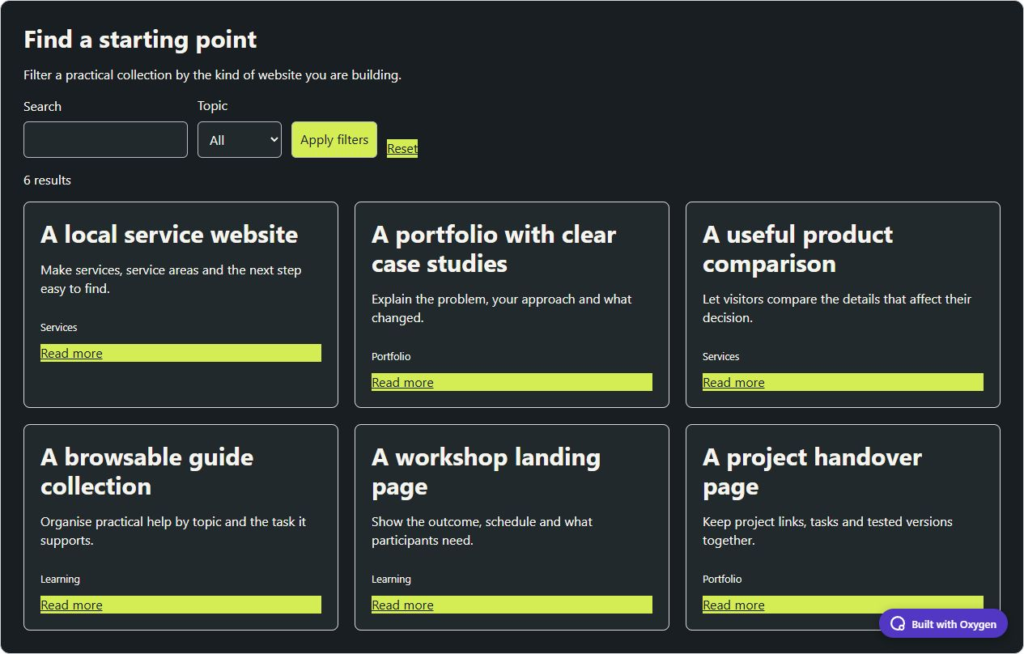
- Choose Manual cards. Add a title, description, optional WordPress media image, destination link and comma-separated filter tags to each card.
- Use consistent tags such as Services, Portfolio and Learning. The filter options are generated from the cards.
- Add up to 100 cards. Search matches titles and descriptions. Combine the search with a tag, check the result count and reset the view.
- Use the visibility toggles to show or hide images, descriptions, topics and link text. Set responsive columns in Design → Container and style the individual cards and filters.
Shareable results and multiple libraries
Search, filters and pagination use GET parameters and work without JavaScript. Each saved instance has a separate prefix, so one library’s search does not replace another’s. When duplicating an element, save and reload before sharing its filtered URL. Active search, filter and pagination variants receive noindex; with Yoast, their canonical points to the base page while preserving unrelated URL parameters.
This is a paginated collection, not a full-site crawler. A large catalogue still needs well-chosen taxonomies and clear excerpts. If the library is unavailable, verify the post type is public and each taxonomy is attached to it. An empty result should offer a reset, not an unexplained blank area.
Style it through Oxygen
Open Design and expand the part you want to change. Container controls the background, text colour, accent and padding. Use the native Typography and Borders and shadows popouts for fonts, corners and shadows. Style fields, cards or buttons in their own sections. Choose an Oxygen breakpoint before changing responsive values; your custom breakpoints work too. Two instances can have different colours and layouts without writing CSS.
The demos use my charcoal and lime colours. New elements inherit your site’s typography and start with neutral defaults. Save, reopen the builder and check the published frontend after changing a setting.
Requirements and tested versions
Install Oxygen Workflow Elements 2.0.0 on a separate test site first. It requires the new Oxygen 6, WordPress 6.0+ and PHP 8.0+. The practical tests used WordPress 7.1.2, PHP 8.5.11, Oxygen 6.2.0-beta.9 and Oxygen 6.2 RC1. Oxygen Classic is not supported. Breakdance extensions, WooCommerce and paid services are not required.